Swimlane Diagram
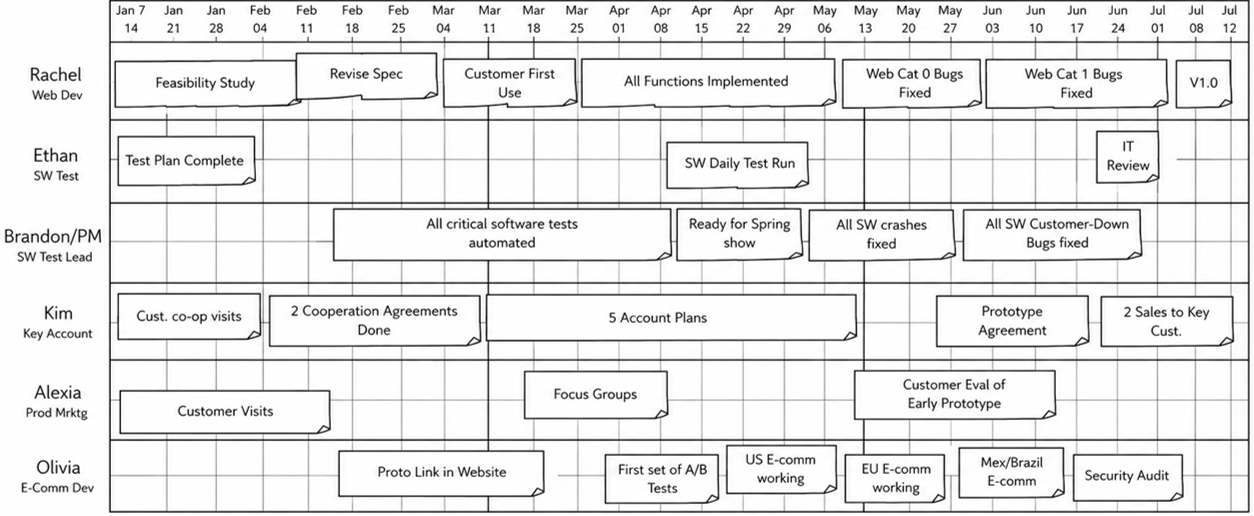
The swimlane visualization is perhaps the single most important differentiator of Visual Project Management (VPM) compared to other project tracking methods. While many systems list tasks or show timelines in isolation, the swimlane view makes visible how work flows across functions — revealing dependencies, handoffs, and gaps that other methods often hide. By combining a shared calendar, structured swimlane headers, layered task schedules, and a health-focused information pane, this layout brings clarity to even complex, multi-team projects. In the sections that follow, we'll explore each component in detail and show how the swimlane diagram turns static project data into a dynamic, actionable view of execution.
Layout
- At the top, the Calendar provides a shared timeline that aligns all tasks and events across swimlanes. It shows progress (the completion level of the least done task). On the left side of the diagram, the Swimlane Headers identify the team and function responsible for each lane and are designed with height limits to keep the overall view manageable. To the right of each header, the Swimlane Schedule displays the actual tasks over time, making it easy to follow work progress and interactions between teams.
The Calendar
The top section of the diagram contains the calendar timeline, which acts as a shared time reference across all swimlanes. Each column represents a specific date, and in this prototype, dates are grouped by day, allowing users to see project activity on a daily level. The timeline ensures alignment across teams by showing when tasks are scheduled and when events occur, using visual markers like fire icons to flag important dates such as deadlines, milestones, or risk points. This shared calendar is visually anchored to the entire diagram, so scrolling through schedules below keeps the timeline in sync across the view.
The Swimlane Headers
The left-hand column includes the swimlane headers, which provide contextual information about each lane. Each header includes metadata such as the swimlane name, owner, function, discipline, and an optional link to more detailed content or external references. Each swimlane header has a defined maximum height to preserve overall visual clarity. When the schedule for a swimlane exceeds this height, the lane activates its own internal vertical scrolling, allowing the user to access all tasks without expanding the lane's footprint. This design ensures that no single lane dominates the view, keeping multiple swimlanes visible at once — a critical requirement for understanding inter-lane flow and coordination. Users are encouraged to minimize swimlane height by structuring and consolidating tasks where possible, to maximize visibility across the project.
The Swimlane Schedules
To the right of each header is the main scheduling space — the swimlane itself. This area is where project tasks, deliverables, and handoffs are visualized over time. Each swimlane forms a horizontal row across the calendar, making it easy to track individual team or function progress along the project timeline. These areas are filled with task bars, dependencies, and visual cues for critical path or handoff points. By aligning schedule content with the fixed header and shared calendar, this structure supports intuitive navigation and quick visual assessment of project flow.
Lane Structure and Ordering
A VPM swim lane diagram has a fixed lane ordering. Getting this right is essential — it determines what the team sees first, what gets the most visual attention, and how quickly someone can orient themselves.
The Gate Lane (Top)
The top lane is reserved exclusively for gates and major milestones. No tasks or deliverables belong here. This lane defines the project's phase boundaries — the shared timeline that every functional lane works against.
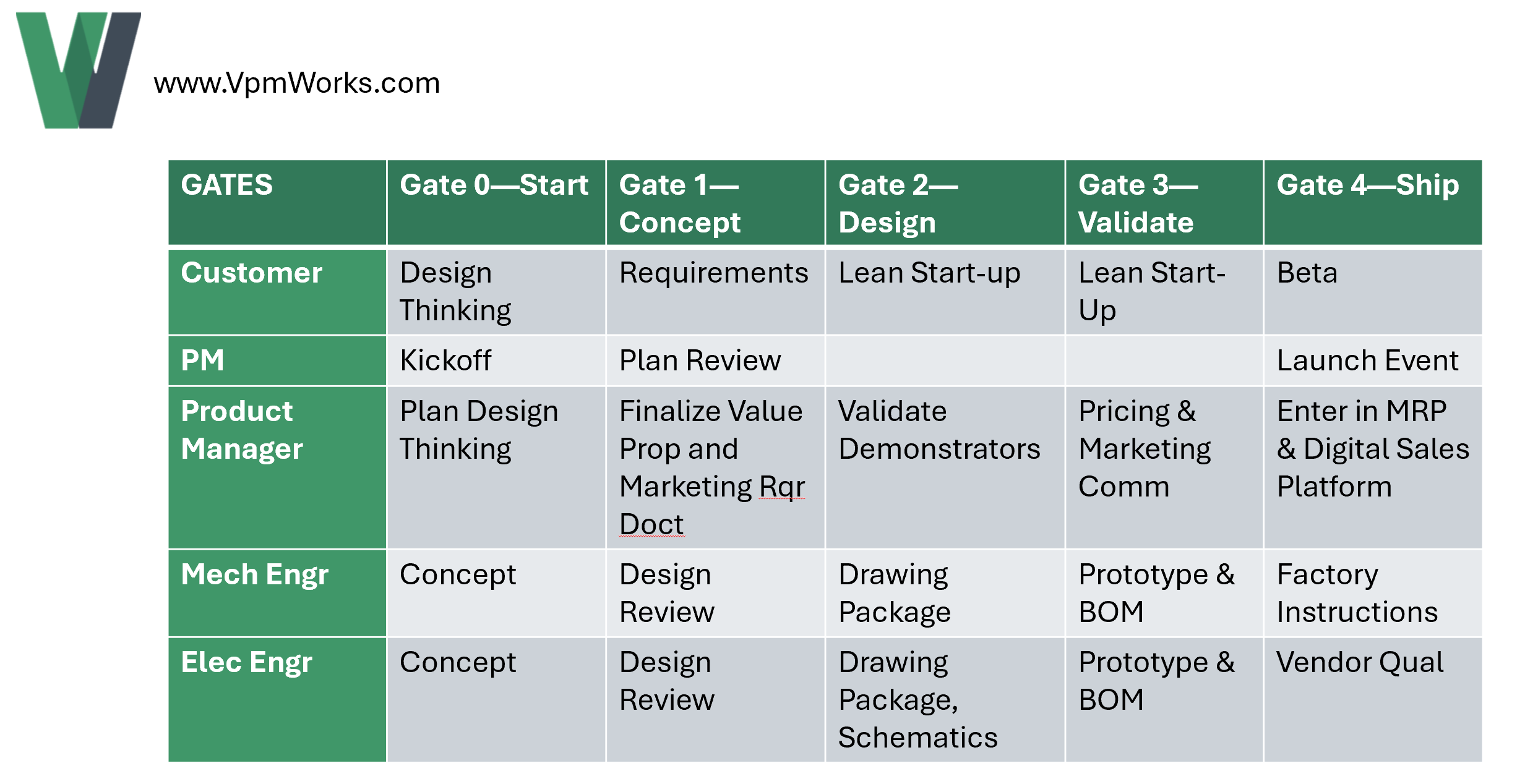
Gates are single-day events that mark the completion of a phase. Gate 0 typically represents the project start (no work done yet). Gate 1 marks the end of the first phase — for example, "Concept Complete" — meaning all planned concept work across all functions is done.
Key rules for the gate lane:
- Only gates and project-level milestones appear here — never tasks, never deliverables
- Gates are shared across the entire project — every functional lane works within the same phase structure
- The gate lane is the visual anchor; it's always the first thing someone reads when looking at the diagram
Functional Lanes (Below Gates)
Below the gate lane, the functional swim lanes appear in a deliberate order:
- Customer lane — if the project has external customer interactions, reviews, or approvals, this lane comes first. The customer's timeline drives everything else. Usually, the Product Manager (Product Marketer) owns the customer lane since customers don't particpate in project management. Put the customer at the top to communicate to the team that the customer is the focus of every project, even if it's an internal customer for a given project. If the customer lane is empty or just has a few tasks at the start (interviews) and end (beta) something is wrong--customers should be participating throughout a project. Refer to Design Thinking and Eric Reis' Lean Start-Up for relevent techniques.
- Project Manager lane — PM coordination tasks, reviews, and decision points.
- Functional lanes — Engineering, Software, Manufacturing, Testing, etc. The most active functions should be placed higher for visual prominence. There's no rigid rule for ordering among functional lanes — use judgment based on which functions drive the most cross-functional activity.
This ordering ensures that the most important coordination points — customer commitments and PM oversight — are always visible at the top of the working area, immediately below the gate timeline.
Gates Own Phases, Not Lanes
This is the most important structural rule in VPM:
A gate owns all tasks within its phase, across every swim lane.
A phase is the time period between two consecutive gates (or between project start and the first gate). Every task in every functional lane that falls within that time period belongs to that gate's phase. Gate ownership crosses swim lane boundaries.
For example, if Gate 2 is "Design Freeze" on April 15:
- A mechanical design task from March 1 to April 10 belongs to the Gate 2 phase
- An electrical schematic review on April 12 belongs to the Gate 2 phase
- A software architecture task from March 15 to April 14 belongs to the Gate 2 phase
All three tasks, in three different swim lanes, are children of Gate 2. When the team tracks progress toward Gate 2, they're tracking all of this work — not just work in one lane.
This cross-lane ownership is what makes the gate lane the project's shared scoreboard. The fever chart tracks buffer consumption against the active gate. The stand-up meeting walks each lane's progress toward the current gate. Everyone is working toward the same deadline.
Gates Mark Completion, Not Start
Gates are placed at the end of work, not the beginning. A gate says "this phase is done" — it's the checkpoint where the team confirms that all planned work for that phase is complete and the project is ready to move forward.
This means:
- Gate 0 is the project kickoff — no work has been done yet
- Gate 1 marks the end of the first phase (e.g., "Concept Complete")
- Gate 2 marks the end of the second phase (e.g., "Design Freeze")
- The final gate is the project's end — all work done, product shipped
Tasks within a phase should complete before their gate date. The gap between the last task's end date and the gate date is buffer — managed time that protects the schedule. The fever chart tracks how that buffer is being consumed.
Tasks Stay in Their Lane
While gates own work across all lanes, tasks own deliverables only within their own lane.
A task is a block of work assigned to a specific function. Its deliverables — the detailed work products that make up the task — live in the same swim lane as the task. Deliverables do not cross lane boundaries.
If a deliverable needs input from another function, that's a handoff — a pitcher/catcher relationship between tasks in different lanes. The handoff is the coordination mechanism, not a parent-child relationship. The deliverable stays in its own lane under its own task.
Task Hierarchy Summary
| Level | Type | Lives In | Parent | Owns Across Lanes? |
|---|---|---|---|---|
| L1 | Gate | Gate lane (top) | None | Yes — owns all L2 tasks in its phase**, in every lane |
| L2 | Task | Functional lane | Gate (L1) in the same phase | No — stays in its lane |
| L2 | Milestone | Functional lane | Gate (L1) in the same phase | No ownership |
| L3 | Deliverable | Same lane as parent Task | Task (L2) | No — stays in its lane |
**A gate owns the phase it ends. That phase starts with the previous gate or, if there is no previous gate, the project start.
What Belongs in Each Lane
Gate Lane:
- ✅ Gates (phase boundaries)
- ✅ Project-level milestones (customer ship date, regulatory filing deadline)
- ❌ Tasks
- ❌ Deliverables
Functional Lanes:
- ✅ Tasks (work blocks with duration)
- ✅ Milestones (single-day checkpoints within a function)
- ✅ Deliverables (detailed work products under a task)
- ❌ Gates
Today vs. Progress
Another unique feature of the VPM swimlane diagram is its dual-calendar indicators: "Today" and "Project Progress." While "Today" simply marks the current calendar date, "Project Progress" represents how far the project has actually advanced based on the least-complete active task. For example, if the least-done task is a 10-day task that is halfway complete, progress is shown as the task's start date plus 5 days. The gap between Today and Project Progress reveals potential buffer burn — a visual cue that work may be slipping behind the calendar. This concept is foundational to daily management in VPM. Although we'll explore the response strategies in that section, it's important to note that VPM assumes a basic discipline: at each Daily Management meeting, the team aims to make enough measurable progress to match the number of calendar days that have passed since the last meeting. This simple expectation helps teams maintain pace without relying on abstract burndown charts or back-loaded deadlines.
Arranging Tasks to Reveal Flow
In traditional Gantt charts, arranging tasks is usually straightforward. Each task is placed on its own row, and the layout generally follows dependency logic — one task is shown as a predecessor to the next, marching down the screen in a structured, linear fashion. While there is some flexibility in task order, especially when tasks have multiple dependencies, the strict row-per-task formatting tends to guide placement automatically.
Agile methods take a different approach. In most Agile tools, task structure is minimal and primarily organizational. Tasks are grouped into epics or together when they are expected to evenually be in the same sprints, but visual layout rarely conveys flow. There's typically no attempt to represent dependencies visually, and all tasks are displayed at the same size and position within a column. This makes Agile boards fast and flexible, but not particularly useful for understanding how work moves through a project.
Visual Project Management (VPM) takes a different path — one that requires more thoughtful task arrangement but offers a powerful return: intuitive visual flow. In VPM, horizontal task placement is determined by start and end dates, anchoring the task to the calendar. However, vertical placement and task height are at the project manager's discretion, and these can be used deliberately to show how the work flows through the project.
For example, when several tasks flow sequentially from one to the next, they can be placed in a straight horizontal line, all at the same height. This creates a visual "run" of tasks that clearly shows a linear handoff or tightly coupled workflow. In another example, a project may involve back-and-forth coordination between two functions — such as engineering and procurement. In VPM, this sequence can be arranged so that the tasks alternate horizontally across the two lanes, with visual spacing left between tasks to maintain clarity. When viewed together, the alternating pattern reveals the handoffs naturally, without needing arrows or annotations. Marking them in the same critical path reinforces that this is the most important set of handoffs.
These are just two of many possible layout strategies. The real value comes from a project manager's ability to visualize and express workflow structure through thoughtful task placement. When task flow is made visually intuitive, teams can better understand how the project moves from start to finish. That clarity enables them to respond more effectively to issues as they arise — without relying on the project manager to provide constant direction. This aligns with lean principles: responses to problems should happen at the lowest level capable of resolving them. By making the flow of work visible, project managers turn team members into problem solvers, rather than keeping themselves as the single point of control.
Choosing the Right Task Granularity
In Visual Project Management, one of the most important — and often overlooked — design decisions is task granularity. This is especially critical in the daily management schedule, where the timeline is shown at a daily resolution to support hands-on coordination. Higher-level views of the project may show a two-year roadmap resolved to weeks or even months, but daily management zooms in on a segment — typically 4 to 6 months — where the team is driving toward something of consequence, like passing a tollgate. This window is short enough that losing a day matters, but long enough to allow delivering meaningful value as a team.
Within this daily view, the duration of each task shapes how understandable — or how opaque — the flow of work becomes. If tasks are too small — for example, averaging one day each — the screen becomes cluttered with excessive detail. The swimlane turns into a wall of micro-steps, and the visual clarity of handoffs, dependencies, and progress disappears. At the other extreme, tasks that span 4 to 8 weeks are too broad to show useful flow. These large blocks often obscure multiple deliverables and dependencies, hiding the actual work and making it difficult to coordinate across lanes.
Long tasks also magnify a cognitive bias known as the Dunning-Kruger effect — the tendency for people to think they understand a complex task at the start better than they do, and then overestimate progress early in a task. This leads to the familiar problem of team members reporting that they're "80% done" when in reality they're only 20% into the work. With long tasks, this misjudgment can result in large scheduling errors — weeks or even months. With shorter tasks — 3 to 5 days in length — the same overconfidence might still occur, but its impact is limited to a day or two, which is much easier to recover from.
As a rule of thumb, the ideal task duration in a daily management view is 3 to 10 days. This level of granularity makes it possible to see how work flows, identify missed handoffs, and spot problems early. It isn't a rigid rule — exceptions make sense for long-lead items or passive wait times. But project managers should guide the team toward granularity that supports flow. If a swimlane fills with dozens of one-day tasks, suggest they be grouped into meaningful chunks that begin and end with handoffs or deliverables. If you see multiple large tasks that stretch over weeks, prompt the team with questions like:
"This looks like you plan to work in a vacuum for two months — is that really how this will go?"
This comes up often with software teams, who sometimes fall back on generic sprint calendars. In these cases, ask:
"Are there checkpoints where you share early implementations with internal or external customers? Shouldn't those be shown as handoffs?"
By thinking deliberately about task granularity, project managers make the schedule a visual model of how work flows — not just a record of who is busy. That's a key step toward building shared understanding and faster response to the unexpected.
Swim Lane Tasks
Tasks as Rich Visualizations In VPM, tasks are more than basic schedule entries — they are compact, information-dense visual elements that convey the state of the project at a glance. Each task object communicates multiple layers of status, helping both the team and leadership quickly interpret project health and flow.
At a baseline, every task shows its name, start date, and end date, giving clear visibility into when work is planned. Ownership is shown by the swimlane in which the task is placed, signaling who is accountable — equivalent to the "A" in a RACI chart. This provides immediate clarity on who owns delivery, even in cross-functional environments.
Predecessor and successor relationships are also visually represented and play a key role in highlighting dependencies. In VPM, these should focus primarily on cross-swimlane handoffs — the places where coordination between teams matters most. Dependencies within a swimlane are usually managed informally by the team itself, which already works closely together and doesn't need visual scaffolding to stay aligned. Overusing intra-lane dependencies creates clutter and obscures the much more consequential cross-lane handoffs, which are the points where delays, confusion, or misalignment are most likely to arise. Keeping the focus on cross-lane links helps surface the real project risks and keeps the visualization clean and actionable.
Beyond dependencies, tasks communicate real-time project status. A task can show whether it has started, is on track, ahead, behind, or completed, using visual cues like shading, icons, or border styles. Tasks can also indicate whether they are contributing to buffer erosion, drawing attention to areas where slippage is consuming the time margin meant to absorb uncertainty.
If the project is managed with a defined critical path, tasks on that path are visually marked, helping the team focus attention on the most schedule-sensitive items. Tasks may also be marked "Not Applicable," a subtle but important distinction in cross-functional projects where some standard steps — like a hardware phase-gate — don't apply to software or service work. Rather than deleting these tasks, marking them N/A keeps the structure intact while clarifying relevance.
This layered task representation turns each schedule object into a living status card — one that supports rapid situational awareness and better day-to-day decisions.